Nagios监控系统
Nagios是一款开源的电脑系统和网络监视工具,能有效监控Windows、Linux和Unix的主机状态,交换机路由器等网络设置,打印机等。在系统或服务状态异常时发出邮件或短信报警第一时间通知网站运维人员,在状态恢复后发出正常的邮件或短信通知。
Nagios的功能是监控服务和主机,但是他自身并不包括这部分功能,所有的监控、检测功能都是通过各种插件来完成的。
Nagios提供了许多插件,利用这些插件可以方便的监控服务状态。
- Nagios Core: Download the core monitoring engine and a basic web interface.
- Nagios Core Plugins: Download the latest Nagios Core plugins package (50 plugins).
- Nagios Core Frontends: See a variety of Open Source front-ends by the community.
- Nagios Core Addons: See additional projects that extend Nagios Core functionality.
测试环境:
- Linux: CentOS 7
- Nagios: 4.1.1
- Nagios-plugins: 2.1.1
- nrpe-plugins: 2.15
2.1 源码安装过程
官方文档:Nagios Quickstart Installation Guides
安装依赖程序:
- Apache
- PHP
- GCC compiler
- GD development libraries
- Perl, unzip (编译过程需要)
命令:
1
2
3
4
| yum install httpd php
yum install gcc glibc glibc-common
yum install gd gd-devel
yum install net-snmp unzip
|
2.1.1. 建立需要的用户、组
1
2
3
4
5
6
| su -l #切换至root
/usr/sbin/useradd -m nagios #添加用户nagios
passwd nagios #修改nagios密码
/usr/sbin/groupadd nagcmd #添加组nagcmd
/usr/sbin/usermod -a -G nagcmd nagios #将nagios和apache用户添加到nagcmd组
/usr/sbin/usermod -a -G nagcmd apache
|
2.1.2. 下载nagios源码及插件包
百度云:nagios-4.1.1.tar.gz, 百度云:nagios-plugins-2.1.1.tar.gz, 百度云:nrpe-2.15.tar.gz
1
2
3
4
| mkdir ~/downloads
cd ~/downloads
[five@localhost downloads]$ ls
nagios-4.1.1.tar.gz nagios-plugins-2.1.1.tar.gz nrpe-2.15.tar.gz
|
2.1.3. 编译安装nagios
1
2
3
4
5
6
7
8
9
10
11
12
13
14
15
| [five@localhost ~]$cd ~/downloads
[five@localhost downloads]$tar xzf nagios-4.1.1.tar.gz
[five@localhost nagios-4.1.1]$cd nagios-4.1.1
# 运行配置脚本
[five@localhost nagios-4.1.1]$./configure --with-command-group=nagcmd
# 编译源码
[five@localhost nagios-4.1.1]$make all
# 安装二进制程序、初始化脚本、配置文件及设置外部命令权限
[five@localhost nagios-4.1.1]$ sudo make install
[five@localhost nagios-4.1.1]$ sudo make install-init
[five@localhost nagios-4.1.1]$ sudo make install-config
[five@localhost nagios-4.1.1]$ sudo make install-commandmode
|
此时先不要启动nagios,还需要后续几个步骤~~
2.1.4. 自定义设置
这里主要是邮件设置,修改/usr/local/nagios/etc/objects/contacts.cfg文件中nagiosadmin用户的邮箱为预计用于接收报警的邮箱。
2.1.5. 配置web访问、自定义管理员密码
1
2
3
4
5
6
7
8
| [five@localhost nagios-4.1.1]$ sudo make install-webconf
# 修改Nagios用户密码
[five@localhost nagios-4.1.1]$ sudo htpasswd -c /usr/local/nagios/etc/htpasswd.users nagiosadmin
New password: xxxx
Re-type new password: xxxx
Adding password for user nagiosadmin
# 重启httpd服务
[five@localhost nagios-4.1.1]$ sudo systemctl restart httpd.service
|
2.1.6. 编译安装Nagios-plugins/nrpe-plugins插件
nagios-plugins:
1
2
3
4
5
6
| [five@localhost nagios-plugins-2.1.1]$ cd ~/downloads
[five@localhost nagios-plugins-2.1.1]$ tar xzf nagios-plugins-2.0.3.tar.gz
[five@localhost nagios-plugins-2.1.1]$ cd nagios-plugins-2.0.3
[five@localhost nagios-plugins-2.1.1]$ ./configure --with-nagios-user=nagios --with-nagios-group=nagios
[five@localhost nagios-plugins-2.1.1]$ make
[five@localhost nagios-plugins-2.1.1]$ sudo make install
|
nrpe-plugins:
1
2
3
4
5
| tar zxvf nrpe-2.13.tar.gz
cd nrpe-2.13
./configure
make all
make install-plugin
|
在被监控主机安装nrpe并启动后,可通过/usr/local/nagios/libexec/check_nrpe -H 192.168.8.41命令来判断nrpe通信是否正常。
1
2
| [five@nagios-server libexec]$ /usr/local/nagios/libexec/check_nrpe -H 192.168.8.41
NRPE v2.15
|
nrpe-plugins编译过程报错:
./configre阶段报错:checking for SSL headers... configure: error: Cannot find ssl headers
解决:
1
| sudo yum install openssl-devel
|
2.1.7. 启动Nagios
1
2
3
4
5
6
7
8
| [five@localhost ~]$ sudo chkconfig --add nagios
[five@localhost ~]$ sudo chkconfig nagios on
核对nagios配置文件nagios.cfg:
/usr/local/nagios/bin/nagios -v /usr/local/nagios/etc/nagios.cfg
启动Nagios服务:
[five@localhost ~]$ sudo service nagios start
或
[five@localhost ~]$ sudo systemctl start nagios
|
2.1.8. 修改SELinux、防火墙设置
1
2
3
4
5
6
7
8
| # 查看SELinux状态
[five@localhost ~]$getenforce
[five@localhost ~]$ sudo setenforce 0
[five@localhost ~]$ firewall-cmd --state #查看默认防火墙状态(关闭后显示not running,开启后显示running)
[five@localhost ~]$ sudo systemctl stop firewalld.service #停止firewall
[five@localhost ~]$ sudo systemctl disable firewalld.service #禁止firewall开机启动
|
2.1.9. 访问Web管理界面
1
2
| http://localhost/nagios/
用户名:nagiosadmin 密码:htpasswd自定义密码
|
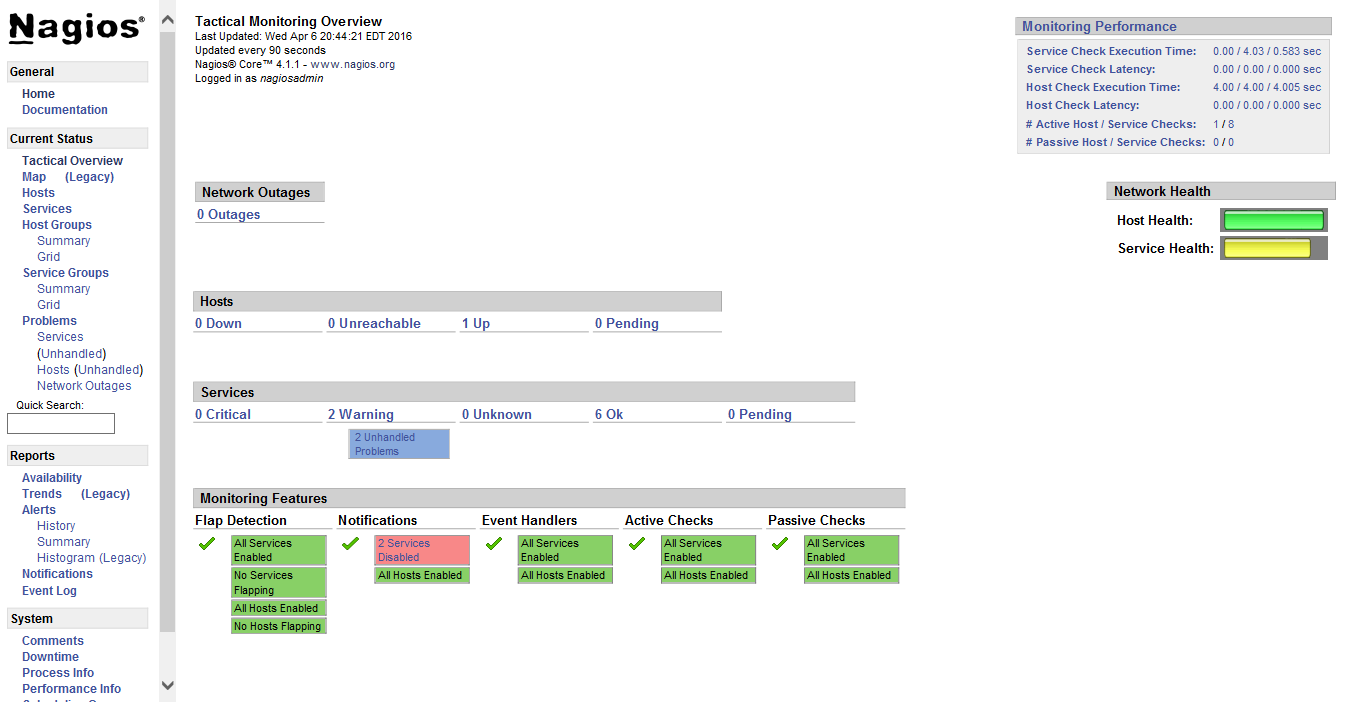
2.1.10. 其他自定义设置
请确认防火墙设置允许访问Nagios服务,更多自定义设置可参考Nagios Support Portal和Nagios Community Wiki
2.2 总结
Nagios的安装过程完整记录暂时写到这里,后续更新将增加Nagios插件使用、Windows/Linux监控、服务监控、网络设备监控。
参考文献
- Nagios Fedora Quickstart
- 20 Command Line Tools to Monitor Linux Performance
- Nagios
- Nagios监控